



Key takeaways
Scattered shopping isn't a personal failing — it's what happens when 12 different systems are each doing 10% of the job.
- Products spread across tabs, screenshots, and store wishlists cost you missed deals, impulse buys, and hours of re-researching things you already decided on once.
- One place, period — not one per store or device — is what actually lets you answer "what do I want" instead of guessing at it.
- Retail is built on infinite scroll and endless recommendations; a clear view of what you already chose is the only real defense against it.
Somewhere right now, there’s a product you want to buy. It’s sitting in a browser tab, a screenshot in your camera roll, a store wishlist you haven’t opened in months — or just a vague memory of “that thing I saw once, somewhere, on some site.”
That’s not organization. That’s how most people manage their shopping: badly, by accident, across a dozen places that don’t talk to each other and were never designed to.
And it costs real money, not just peace of mind.
The cost of scattered shopping
When your shopping lives in 47 different places, the damage shows up the same predictable ways, and none of them feel like a single mistake — they feel like just how shopping is.
You miss deals. That item saved in a tab three weeks ago went on sale and you never noticed. By the time you remember it exists, it’s back to full price.
You buy on impulse. When you can’t see what you already want, you buy whatever’s in front of you right now — no comparison, no consideration, just proximity.
You re-research everything, twice. Those standing-desk comparisons from three months ago, the frontrunner you’d already picked? Gone. Starting over from zero.
You get decision fatigue before you’ve decided anything. Wants scattered across a dozen apps make just figuring out what you want exhausting enough that shopping stops being fun.
One place, period
The fix is almost insultingly simple: put everything in one place. Not one per store, not one per device — one place, full stop.
Every product you’re interested in, from any site, visible in a single view — current price, status, enough structure that it doesn’t collapse into noise.
Once that’s true, you can actually answer questions instead of guessing at them. What are my top five right now? What would it cost to buy everything on this list? What’s gone on sale since I last looked? The fog clears, and shopping stops being a background chore you’re quietly losing at — you can see the whole board instead of one tile at a time.
None of this requires becoming a spreadsheet person. It requires exactly one decision, made once: everything goes here, nowhere else, no exceptions for “just this one thing.”
Make it stick
A system that survives past week one needs three things, no more.
Pick one place, and mean it. A dedicated app, a spreadsheet, a notes doc — doesn’t matter which, as long as everything goes there and nowhere else. Splitting attention across two systems is functionally the same as having none.
Make saving take five seconds. Paste a URL and let something else pull the title, image, and price. A manual system you have to fill out by hand is a manual system you’ll abandon within a month — resist the urge to track fifteen fields when three will do.
Use a few buckets, not one giant pile. “Gift Ideas,” “Wait for Sale,” “Someday / Maybe,” or something tied to whatever you’re actually shopping for right now — a kitchen remodel, a trip, a wardrobe reset. The exact categories matter less than the fact that there are some. Brains sort into buckets far better than they scroll bottomless lists, and a 200-item pile with no structure gets abandoned the same way an empty system does.
Review on a schedule, briefly. Five minutes a week to glance at price drops and cut dead weight; fifteen minutes a month to reorganize. That’s the entire maintenance cost, and skipping it is the only way this breaks.
Chaos in, calm out
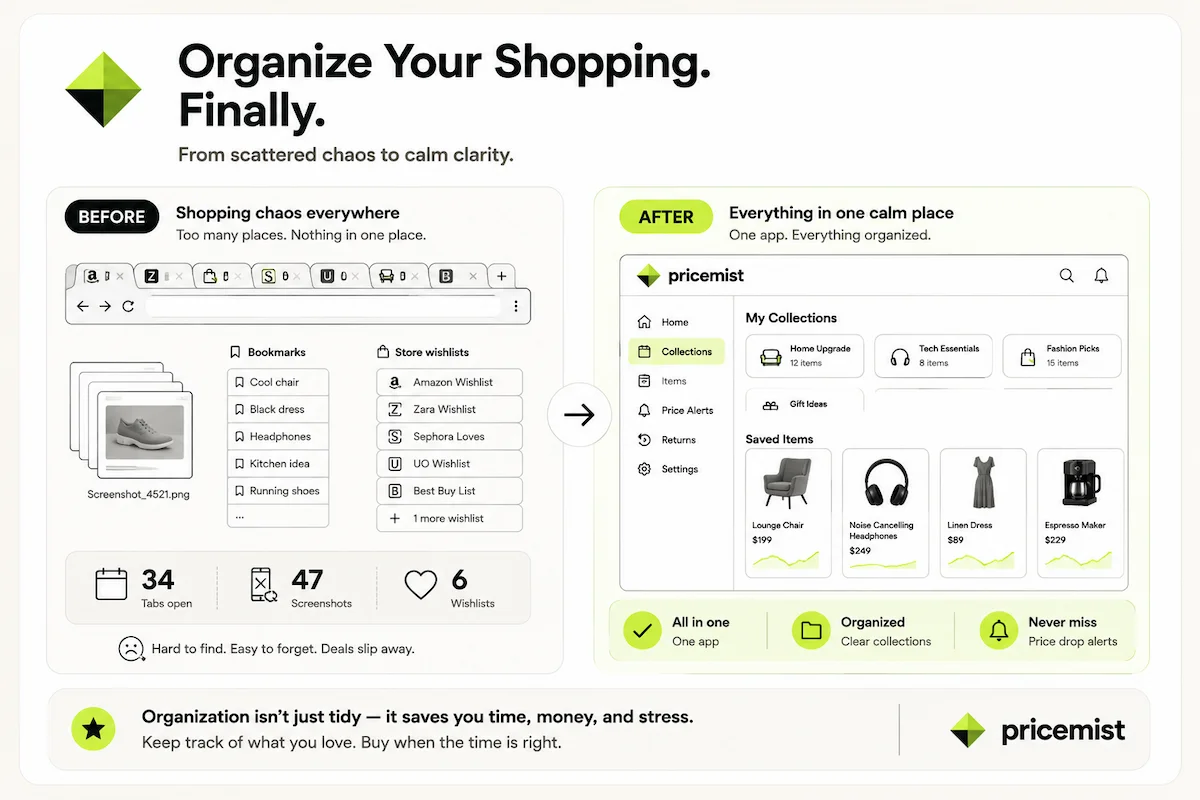
Same person, same shopping habits. Just one system instead of six.
Nothing about the person changes between those two panels — same taste, same browsing habits, same list of things they’d like to own. The only variable is whether it’s spread across six half-abandoned systems or sitting in one place they’ll actually open again.
Retail is built to scatter your attention
Infinite scroll. “You might also like.” Ads that follow you across the internet for a week. Every retailer wants you mid-browse, mid-consideration, never quite finished — the chaos isn’t an accident, it’s the business model. (For the full mechanism, see The Psychology of Open Browser Tabs.)
A clear view of what you already want is the actual defense. A recommended item stops competing with an empty wishlist and starts competing with fifteen things you’ve already chosen on purpose — and it usually loses that fight, because “maybe” rarely beats “I already decided.”
Start simple
You’re not bad at shopping. You’re using bad systems — tabs, screenshots, and six abandoned wishlists were never going to hold up, and losing track of things isn’t a personal failing, it’s the predictable result of the tools you picked.
One place for everything. Reviewed on a schedule. Organized into buckets that make sense to you. That’s the whole system — and once it exists, it does double duty: a shareable wishlist for your birthday, or a joint collection for furnishing an apartment, is just this same setup with one more person added to it.
You’re not spending less time shopping by doing this, unless you want to. You’re just spending it on decisions instead of on hunting through six places for something you already found once.